14 channels, one composer

Write once. Publish everywhere.

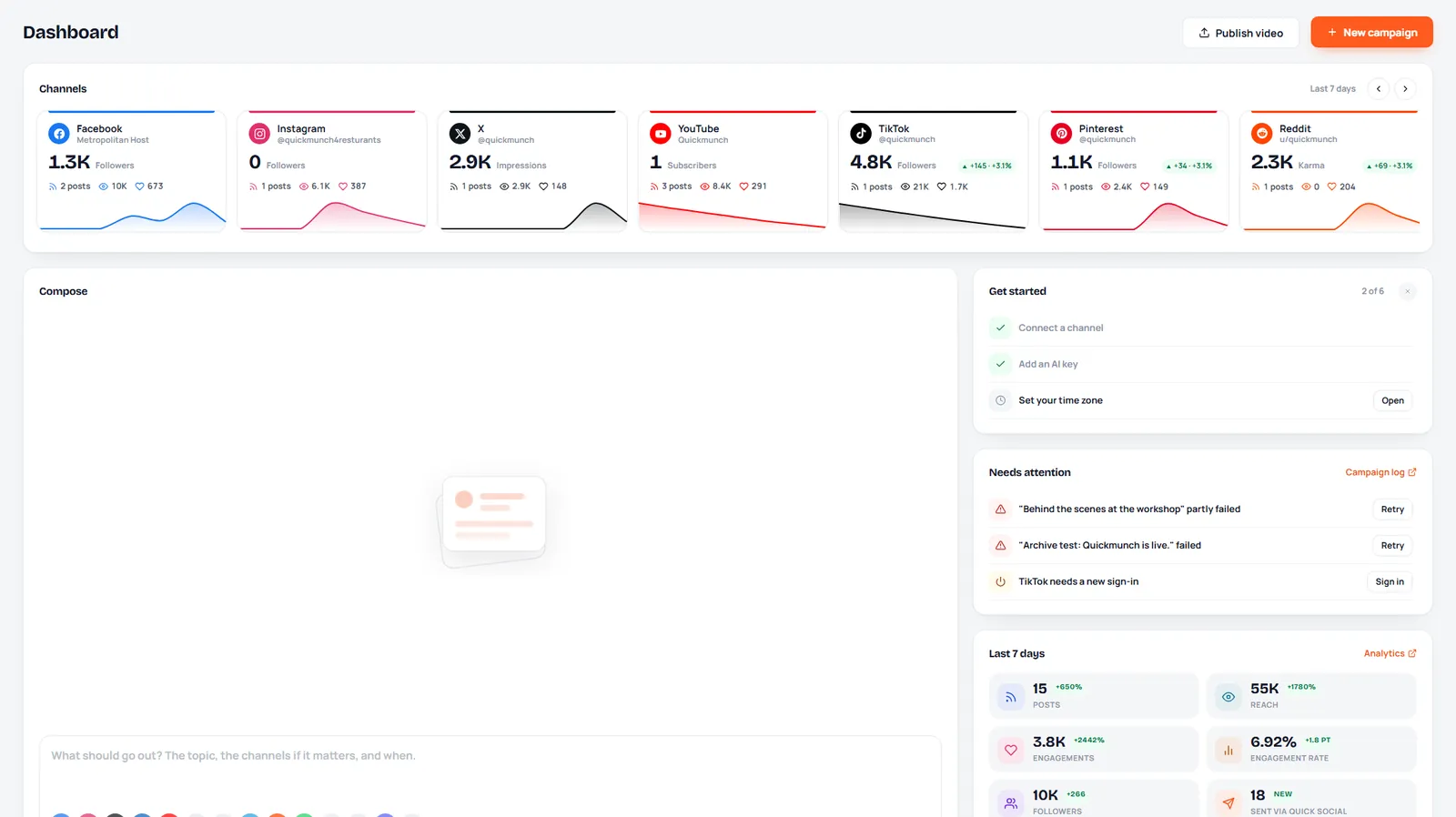
Plan, write and publish social posts and videos to every channel your brand uses, from one calm workspace. AI helps with the words and the images; the calendar and analytics keep it on track.
  • Free plan, no card needed
  • Trials on every paid plan
  • Cancel any time
quicksocialsaas.metropolitanhost.com/app
The dashboard: channels, compose and the week's numbers
Published to 8 channelsAutumn menu launch · just now
ScheduledTomorrow, 9:30
AI caption ready3 versions to pick from

Publish to 14 channels from one place

Facebook Twitter LinkedIn Instagram TikTok YouTube Pinterest Telegram Reddit WhatsApp Threads Bluesky Discord Vimeo Facebook Twitter LinkedIn Instagram TikTok YouTube Pinterest Telegram Reddit WhatsApp Threads Bluesky Discord Vimeo
How it works

From idea to every feed in three steps

01

Connect your channels

Sign in to Facebook, Instagram, LinkedIn, X, TikTok, YouTube and eight more. Each brand gets its own workspace.

02

Write it once

One post, shaped for every channel: captions, hashtags, images and video, with AI to draft and polish.

03

Publish and learn

Send it now or schedule it. Watch reach and engagement per channel and find the best time to post.

Everything in one workspace

The tools a social team reaches for every day

No tabs for every network, no copy and paste between them. Write, plan, create and measure in one place.

Campaign composer

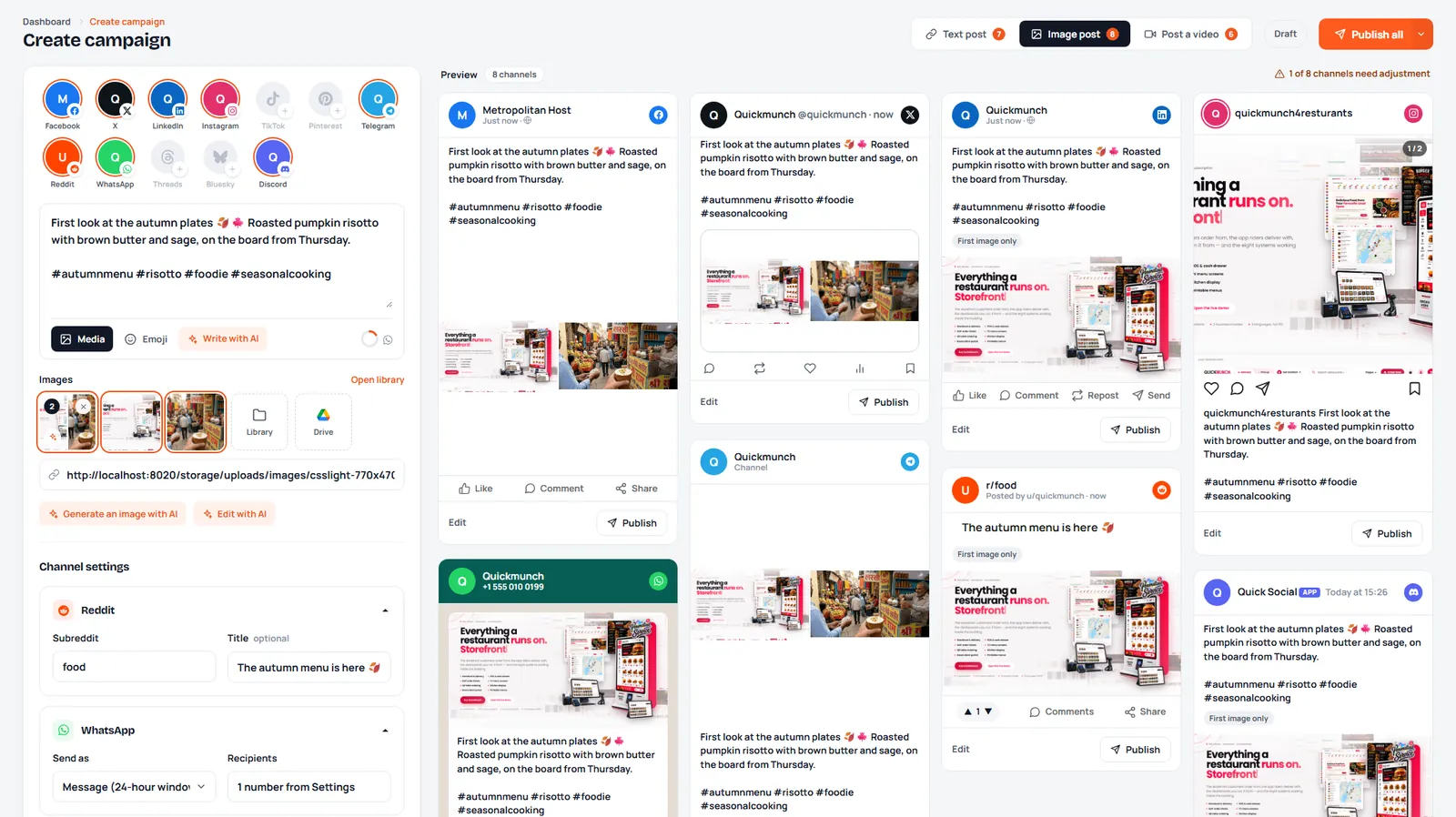
Text, image and video posts with a live preview of how each channel shows them.

Content calendar

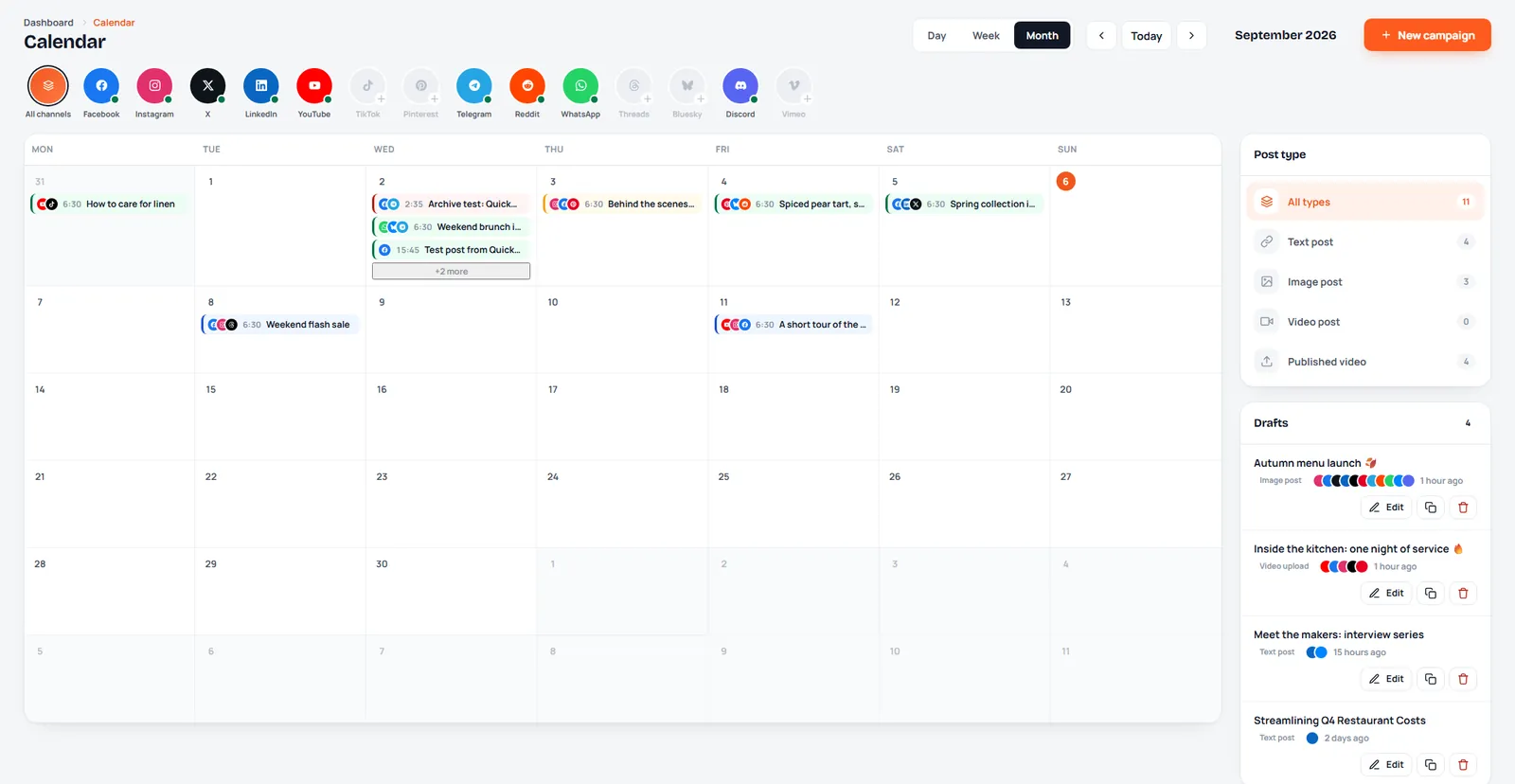
Every scheduled and published post by day, week or month. Drag to move, click to edit.

Video publishing

Upload once to YouTube, TikTok, Instagram Reels, Facebook, Pinterest and Vimeo.

Analytics

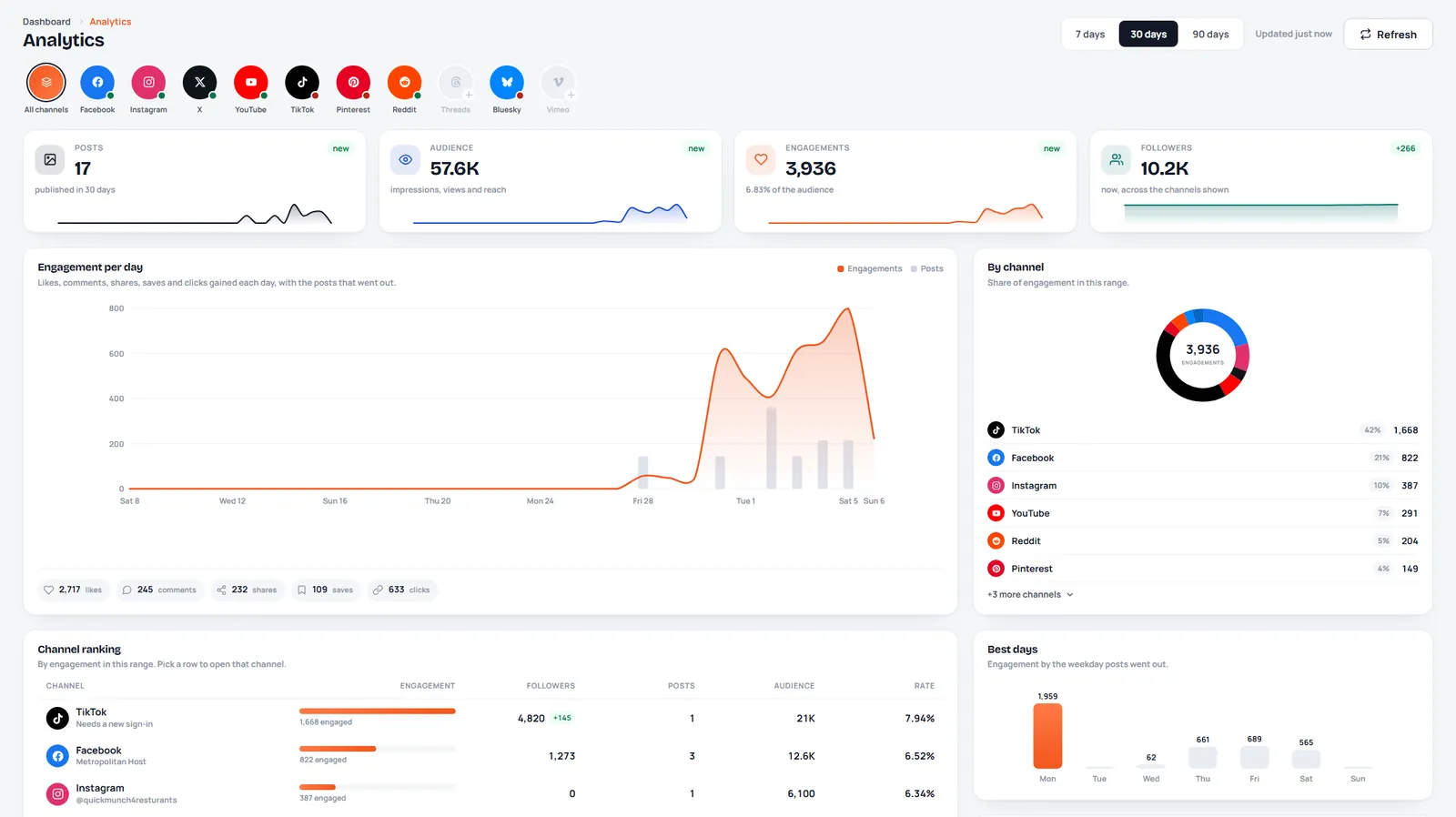
Reach, engagement and followers across channels, the best days and times, and per-campaign results.

AI writer

Draft captions, plan a week of posts and get fresh ideas from your own topics.

Image and video studios

Make thumbnails, social cards and short videos from templates, with AI backgrounds.

Media library

Every upload and creation in one place, with Google Drive import and export.

Workspaces and team

A workspace per brand or client, and team members invited to help run them.

Compose

One post, ready for every channel

Pick the channels, write once and see each preview side by side. Channel settings like subreddits, WhatsApp recipients and YouTube titles sit right below the post.
  • Text, image and video posts
  • Live previews per channel
  • Media from the library, Drive or AI
One post, ready for every channel
Plan

See the whole month at a glance

Scheduled posts, drafts and published work on one calendar, filtered by channel or post type.
  • Day, week and month views
  • Drafts kept beside the calendar
  • Reschedule without starting over
See the whole month at a glance
Measure

Know what works, channel by channel

Engagement per day, audience and followers, a ranking of your channels and the weekdays your posts do best.
  • 7, 30 and 90-day ranges
  • Campaign and video analytics
  • Best days and times to post
Know what works, channel by channel
14channels from one composer
4post types: text, image, video and video upload
1calendar for every brand you run
24/7scheduling that posts while you sleep
Pricing

Start free, grow when you are ready

Every paid plan starts with a free trial. Switch or cancel whenever you like.

Free

Try publishing to a few channels

$0forever
Start free
  • 1 workspace
  • 3 channels per workspace
  • 30 posts a month
  • 20 AI credits a month
  • 250 library storage per workspace (MB)
  • 7 analytics history (days)
  • Image studio
  • Video studio
  • Google Drive

Starter

One brand, every channel it needs

$15 per month
Start 14-day trial
  • 1 workspace
  • 8 channels per workspace
  • 1 team member per workspace
  • 300 posts a month
  • 200 AI credits a month
  • 2,000 library storage per workspace (MB)
  • 30 analytics history (days)
  • Image studio
  • Video studio
  • Google Drive
Most popular

Growth

A small team and a few brands

$39 per month
Start 14-day trial
  • 3 workspaces
  • 14 channels per workspace
  • 5 team members per workspace
  • 1,500 posts a month
  • 1,000 AI credits a month
  • 10,000 library storage per workspace (MB)
  • 90 analytics history (days)
  • Image studio
  • Video studio
  • Google Drive

Agency

Every client in its own workspace

$99 per month
Start 14-day trial
  • 15 workspaces
  • 14 channels per workspace
  • 25 team members per workspace
  • Unlimited posts a month
  • 4,000 AI credits a month
  • 50,000 library storage per workspace (MB)
  • 365 analytics history (days)
  • Image studio
  • Video studio
  • Google Drive

Compare every plan

Questions

Good to know before you start

Anything else? Write to us and a person answers.

Which social channels can I publish to?

Facebook, Instagram, LinkedIn (profile and company page), X, TikTok, YouTube, Pinterest, Telegram, Reddit, WhatsApp, Threads, Bluesky, Discord and Vimeo. How many you connect depends on your plan.

Is there a free trial?

Yes. Paid plans start with a free trial and no card is needed to begin. When it ends your account moves to the Free plan unless you choose a plan.

Can I manage several brands or clients?

Each brand gets its own workspace with its own channels, posts and library. Higher plans include more workspaces and team members.

Can my team help?

Invite team members by email to work in your workspaces. They can write, schedule and publish; billing stays with you.

What happens if I change or cancel my plan?

You can switch plans or cancel at any time. A cancelled plan stays active to the end of the period you paid for, and nothing you made is deleted.

How do I pay?

By card or the payment methods shown at checkout, monthly or yearly. Every payment comes with an invoice.

Your next post can go everywhere at once

Start free today. Connect a channel, write one post and watch it land on every network you use.